
Quick steps
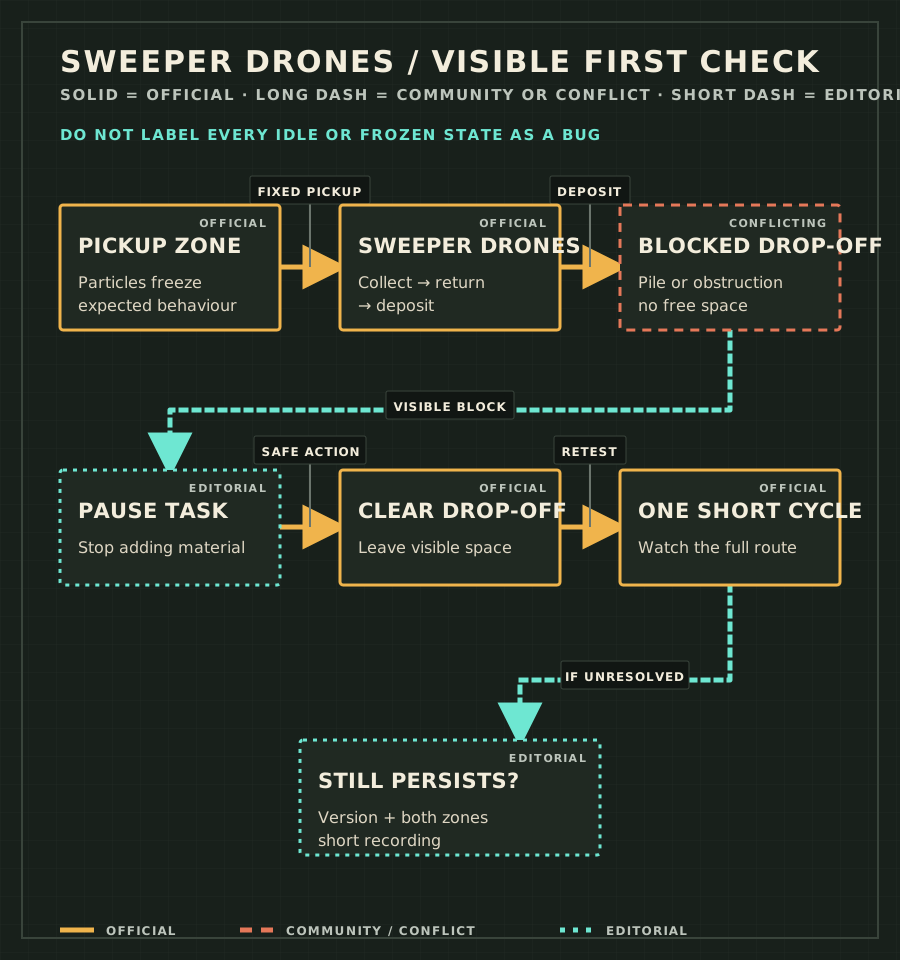
- Name the visible symptom
Separate Drones waiting at the drop-off from particles frozen inside the pickup zone.
- Pause the task
Stop adding material while you inspect the destination.
- Clear the drop-off
Remove the visible pile or obstruction and leave open space where Drones deposit material.
- Restart one short cycle
Watch whether one Drone can collect, return, deposit, and complete the task.
- Record a persistent fault
If behaviour persists after clearing space, keep the save state and capture the game version, both zones, and the full Drone movement.
| Symptom | Visible check | Safe action |
|---|---|---|
| Drones are stuck or waiting at the drop-off | Material or another obstruction fills the deposit area | Pause the task, clear the drop-off area, and leave visible free space. |
| Pickup-zone particles appear frozen | The particles are inside the active pickup zone | Treat this alone as expected behaviour; the official FAQ says particles are held in place for pickup. |
| Drones cannot return or complete the task | The drop-off is clear but a Drone still cannot finish one short cycle | Preserve the state and record both zones plus the complete movement; do not invent a path-width or power rule. |
| Behaviour still persists after clearing space | The same failure repeats on the current build with open drop-off space | Record exact version, save context, zone boundaries, and a short video, then report the issue. |
| Observed area | What to look for | Interpretation | Next action |
|---|---|---|---|
| Blocked drop-off | Pile or obstruction occupies the deposit space | Documented cause of stuck or waiting Drones | Clear space and retest one cycle. |
| Clear drop-off | Visible open deposit area | The first official condition is satisfied | Observe collect → return → deposit. |
| Pickup zone | Particles stop moving inside the selected area | Expected behaviour documented by the FAQ | Do not report this symptom alone as broken physics. |
| Clear drop-off, task still incomplete | Drone fails to return or deposit | Not resolved by the documented first check | Capture evidence for a version-specific report. |
What makes a useful bug report
- Exact game version and platform.
- A wide view showing both pickup and drop-off zones.
- A close view showing the cleared drop-off space.
- A short recording of one complete attempted cycle.
- Whether the state repeats after saving and reloading, without presenting that as a guaranteed fix.
Return to the Troubleshooting Hub
Update history
- 2026-08-25 — Added symptom-based drop-off troubleshooting, the official expected-freeze boundary, and a clear bug-report threshold without unsupported Drone parameters.
Frequently asked questions
Why are my Sweeper Drones stuck at the drop-off?
The publisher-maintained FAQ says the drop-off area must be clear and have available space. Pause the task, clear the visible pile or obstruction, then observe one short cycle.
Are frozen particles inside a Sweeper pickup zone a bug?
Not by themselves. The official FAQ says pickup-zone particles are frozen intentionally so Drones have a fixed place to collect them.