
Quick steps
- Preserve the evidence first
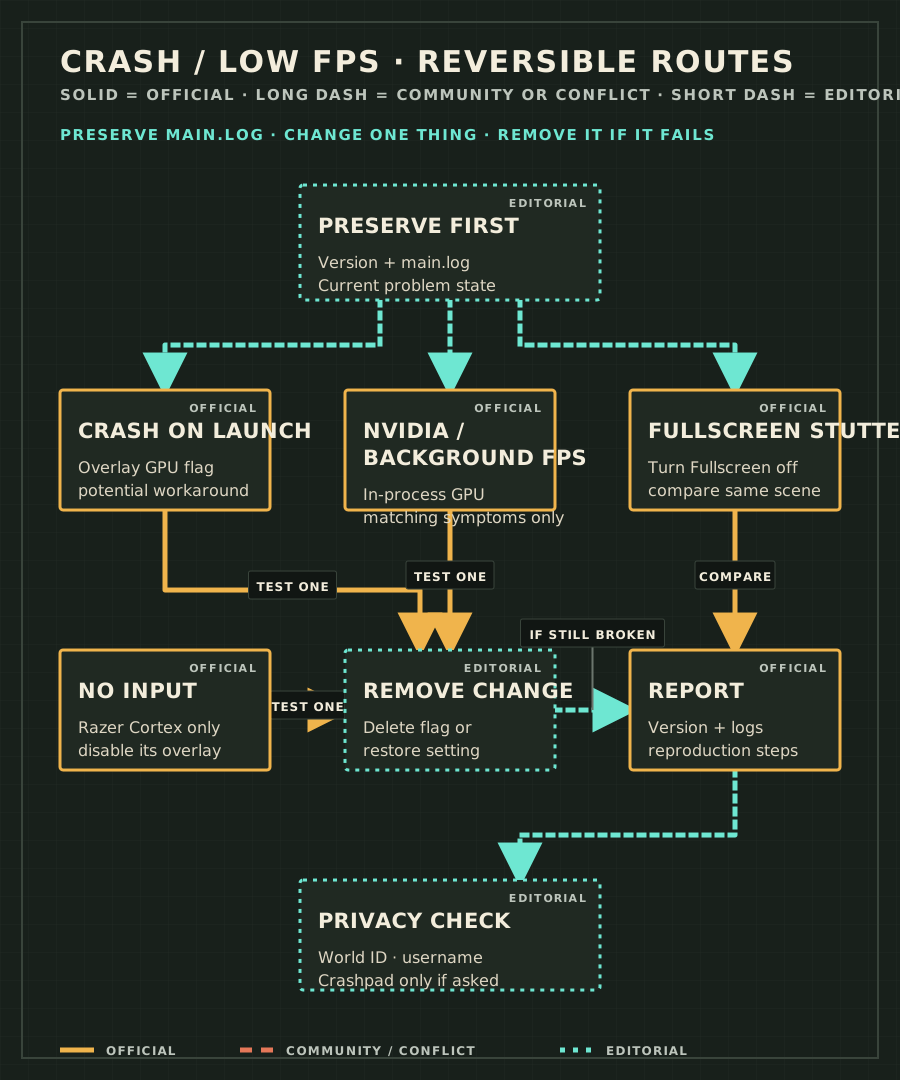
Record the exact version and symptom, then copy the current main.log before relaunching or changing a launch option.
- Choose one matching branch
Do not stack every workaround. Pick the launch, NVIDIA/background FPS, Fullscreen, or Razer Cortex branch that matches what you can observe.
- Make one reversible change
Add one exact flag or disable one named overlay, then relaunch and compare the same scene.
- Remove a failed change
Delete the temporary launch option or restore the setting before trying a different branch.
- Report a persistent failure
Use Esc → Send feedback when available and include the version, expected result, observed result, main.log, and reproduction steps.
| Symptom | First reversible check | If it does not help |
|---|---|---|
| Crashes on launch | Try --sandustry-no-overlay-gpu-flags by itself. | Remove the flag, preserve the new log, and report the launch sequence. |
| Low FPS / background FPS | On the documented NVIDIA/background symptoms, try --in-process-gpu. | Remove the flag and compare the same scene without stacking another option. |
| NVIDIA or overlay-related symptoms | Disable the matching NVIDIA in-game overlay, then restart Sandustry. | Restore the overlay later if it was unrelated and report the exact NVIDIA environment. |
| Fullscreen stutter | Turn Fullscreen off in Settings → Display. | Restore the setting if performance does not change. |
| Game launches but does not respond to input | Only when Razer Cortex is installed, disable its in-game or performance overlay. | Re-enable it if unrelated and preserve the input symptom for a report. |
| Still crashing after official workarounds | Stop changing settings and collect the exact version, main.log, and shortest reproduction. | Use the official in-game report, Discord, or developer email route. |
Launch options: use one, then remove it cleanly
Official developer workarounds
| Exact flag | Applicable symptom | Where to add it | Possible side effect | How to remove it | Evidence level | Source / checked |
|---|---|---|---|---|---|---|
--sandustry-no-overlay-gpu-flags | Launch or gameplay crashes that may involve overlay GPU flags | Steam Library → Sandustry → Properties → General → Launch Options | Steam Overlay will likely stop working; achievements continue. | Delete the exact flag from Launch Options and restart. | Official potential workaround | Pinned developer crash/FPS post · 2026-08-25 |
--in-process-gpu | NVIDIA low FPS, Steam Overlay/Performance Monitor failure, or the game treated as a background app | Steam Library → Sandustry → Properties → General → Launch Options | The checked source does not state a universal side effect; using it outside the matching symptom can obscure the diagnosis. | Delete the exact flag from Launch Options and restart. | Official symptom-specific workaround | Pinned developer crash/FPS post · 2026-08-25 |
Community-reported fallback
| Exact flag | Applicable symptom | Where to add it | Possible side effect | How to remove it | Evidence level | Source / checked |
|---|---|---|---|---|---|---|
--use-angle=gl | Frequent in-game crashes; community-reported fallback only. | Steam Library → Sandustry → Properties → General → Launch Options | The checked source does not document side effects. Remove the flag if rendering or performance worsens. | Delete the exact flag from Launch Options and restart. | Community-reported | Publisher-maintained FAQ; listed as a report from other users. Checked 2026-08-25. |
Other reversible symptom branches
How to preserve logs and report the issue
main.log locations from the official report guide
- Windows — C:\Users\<username>\AppData\Roaming\sandustry\logs\main.log
- macOS — /Users/<username>/Library/Logs/sandustry/main.log
- Linux — /home/<username>/.config/sandustry/logs/main.log
Safe report checklist
- Copy main.log before another launch can change the diagnostic state.
- Record the exact game version, operating system, GPU, symptom, and the one workaround tested.
- Use Esc → Send feedback → Bug when the game is accessible; describe expected and observed behaviour.
- The in-game report includes version, world ID, current tick, settings, and browser information. Review logs, screenshots, save files, and diagnostic files for usernames, World IDs, local paths, or other sensitive information before sharing them.
- Use Discord or contact@sandustry.com only when the in-game route is unavailable, following the official report guide.
- Enable optional Crashpad only when the developer requests it; crash dumps may contain sensitive information.
Return to the Troubleshooting Hub
Check the site evidence and version ledger
Update history
- 2026-08-25 — Added symptom-based crash and FPS troubleshooting, safe removal steps, privacy guidance, and a separately labelled community-reported OpenGL fallback.
Frequently asked questions
Is there one guaranteed Sandustry crash fix?
No. The developer labels these as potential workarounds. Preserve the current main.log, confirm the exact version, and test only the reversible check that matches the symptom.
Where is Sandustry main.log?
The official report guide lists Windows under AppData\Roaming\sandustry\logs\main.log, macOS under Library/Logs/sandustry/main.log, and Linux under .config/sandustry/logs/main.log.
Should I enable Crashpad?
Only if the developer asks. The v0.5.5 update says Crashpad diagnostics are optional and crash dumps may contain sensitive information.